Offline · Local · Your collection stays yours

Build Better DJ Sets, Faster

Turn your Spotify® and Traktor® playlists into a focused, data-driven workflow for discovering tracks, organizing music, and preparing sets. Mix more, scroll less.

v3.0.4 · released 2026-08-05 · Windows and macOS · free · MIT

  • 2023In professional use since
  • 897Automated tests, passing
  • Read‑onlyYour Traktor® collection is never modified
Install

Download it and open it.

Every release carries its own bundled CPython runtime, so there is nothing to install first on either platform. No Python, no Node, no terminal.

Windows

64-bit Verified end to end
  1. Download SetMaster3-3.0.4-windows-x64.zip.
  2. Unpack it into C:\Program Files\SetMaster3, which is the recommended home for it. Windows asks for permission to write there. Any other folder works just as well.
  3. Open the launchers folder and double-click SetMaster 3.vbs. Nothing appears to happen for a few seconds while it starts.
  4. It opens in your default browser. To stop it, double-click Stop SetMaster 3.vbs.

Your sets, notes, and settings live in your Windows app-data folder rather than in the program folder, so replacing the folder with a newer version never touches them. Double-clicking the launcher again while it is already running brings the app back up in the browser rather than starting a second copy.

macOS

Apple silicon · macOS 14 or later Signed and notarized
  1. Download SetMaster-3.0.4-macos-arm64.dmg and double-click it.
  2. Drag the SetMaster icon onto the Applications folder beside it, then eject the disk image.
  3. Open SetMaster from Applications or Launchpad. It opens in your default browser after a couple of seconds.
  4. To stop it, right-click the SetMaster icon in the Dock and choose Quit. Closing the browser tab leaves it running.

The app is signed with a Developer ID, notarized, and stapled, so it opens like any other Mac app. There is no right-click-to-open step and no Privacy and Security detour. Apple silicon only: Intel Macs are not supported. Every Apple silicon Mac can run macOS 14, and the update is free.

Downloading for another machine Every release and every artifact is listed publicly on GitHub.

All releases on GitHub ↗

The one idea

One row is one transition.

The problem is not having too little music. The problem is getting from an idea in your head to the tracks that fit it.

Traktor® and Rekordbox® read a set the way a playlist reads, top to bottom, one track per row, and a note attached to a track there is hard to read. SetMaster reads left to right: where you are leaving, where you are landing, and every cue you set yourself for the move between them.

What it does

The tedious part, automated.

Two jobs, and the first does not depend on the second. The set editor works with nothing loaded at all, and Traktor® is not a prerequisite for using it.

Set editor

Write the set before you play it.

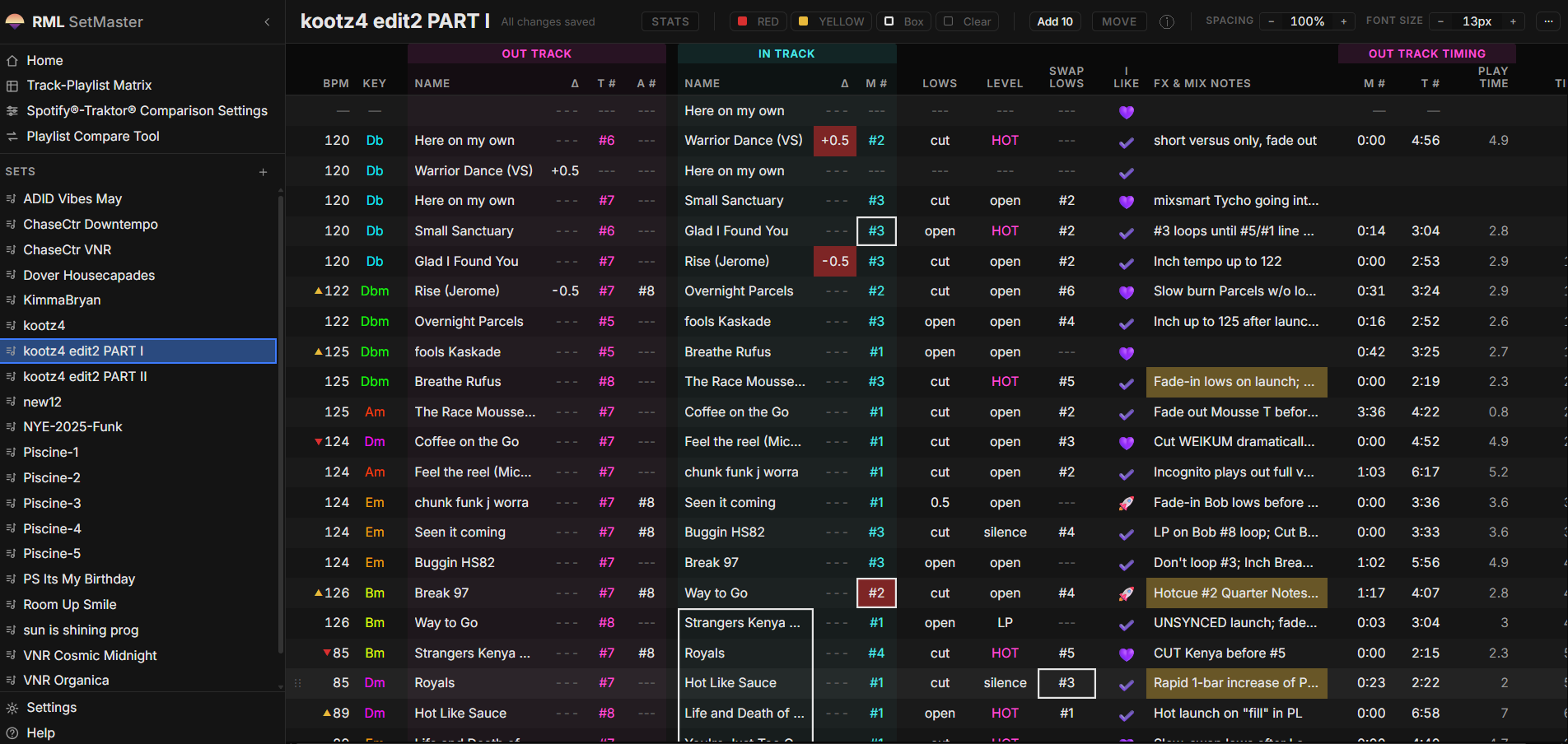
Track order, hot cue numbers, EQ and level moves, timing, and the notes you will actually read at the decks. It becomes the place the set lives, instead of a search you rebuild every session.

  • Formatting you control. RED, YELLOW, and box emphasis stay exactly where you put them.
  • Your own emoji palette. Edit the set, rename the validation lists, make the vocabulary yours.
  • A mix timer. How long each section runs, and how long the whole mix is.
  • Export to CSV, XLSX, and Markdown. The set leaves in a format you can use anywhere.
The set editor open on a real set, showing paired out-track and in-track rows with BPM and key, tempo adjustments, hotcue and loop markers, color-coded emphasis, and per-transition mix notes
The set editor. One real set, read as paired out-track and in-track rows.
Catalog analysis

Filter the whole collection at once.

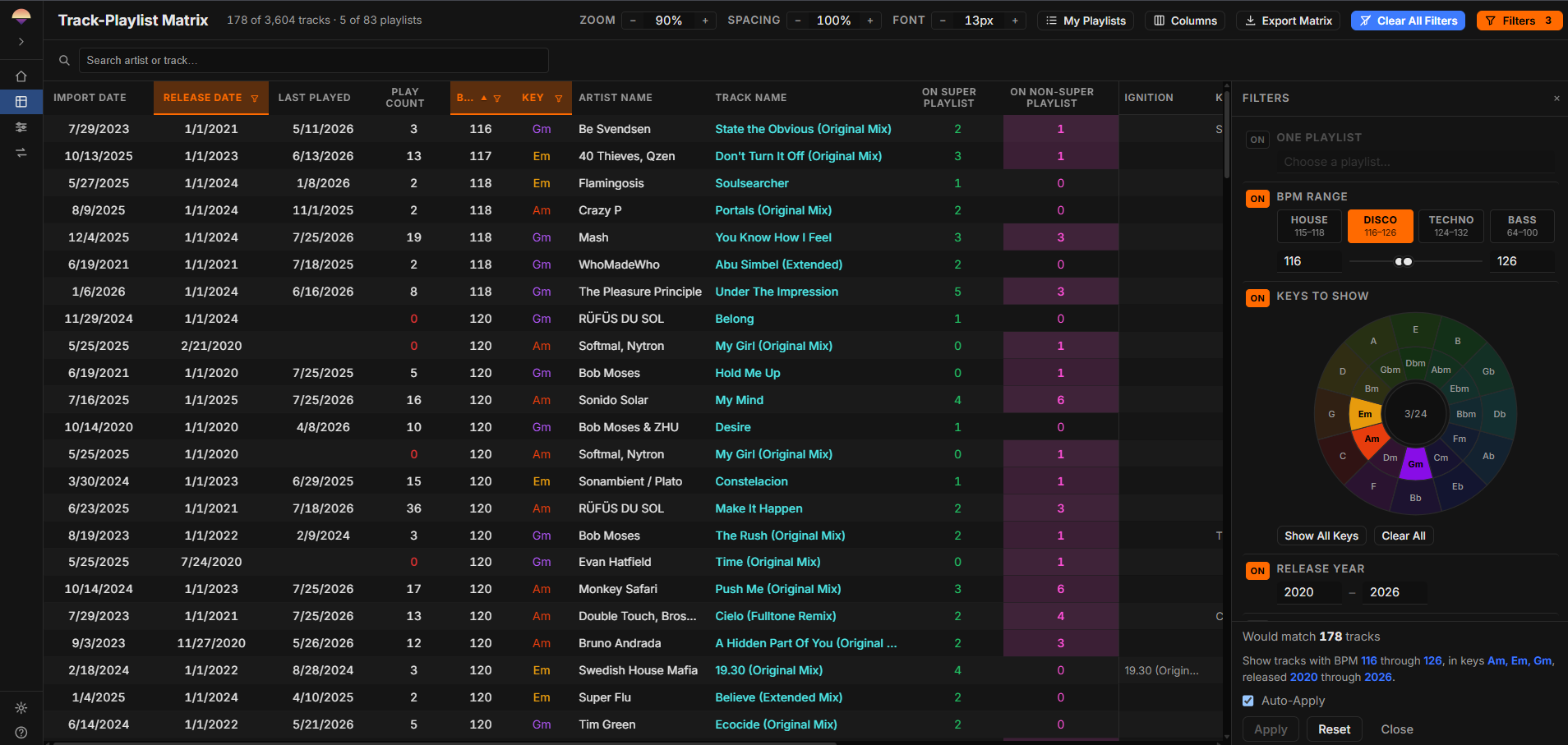
SetMaster 3 reads your Traktor® collection strictly read-only and turns it into something you can query. Compound filters across BPM, key, release year, and playlist membership together, which Traktor® itself does not offer.

  • The Track-Playlist Matrix. Every track against every playlist, so the tracks you own but never organized show up as a gap.
  • Filter and sort in one pass. Switch between views quickly instead of rebuilding a search each time.
  • Nothing is written back. Your collection.nml is opened read-only and never modified.
The Track-Playlist Matrix showing 178 of 3,604 tracks across 83 playlists, with the filter panel open on a BPM range, a key selection, and a release-year range
The Track-Playlist Matrix. 178 of 3,604 tracks matching one compound filter, across 83 playlists.
Playlist compare

What you have been listening to, against what you own.

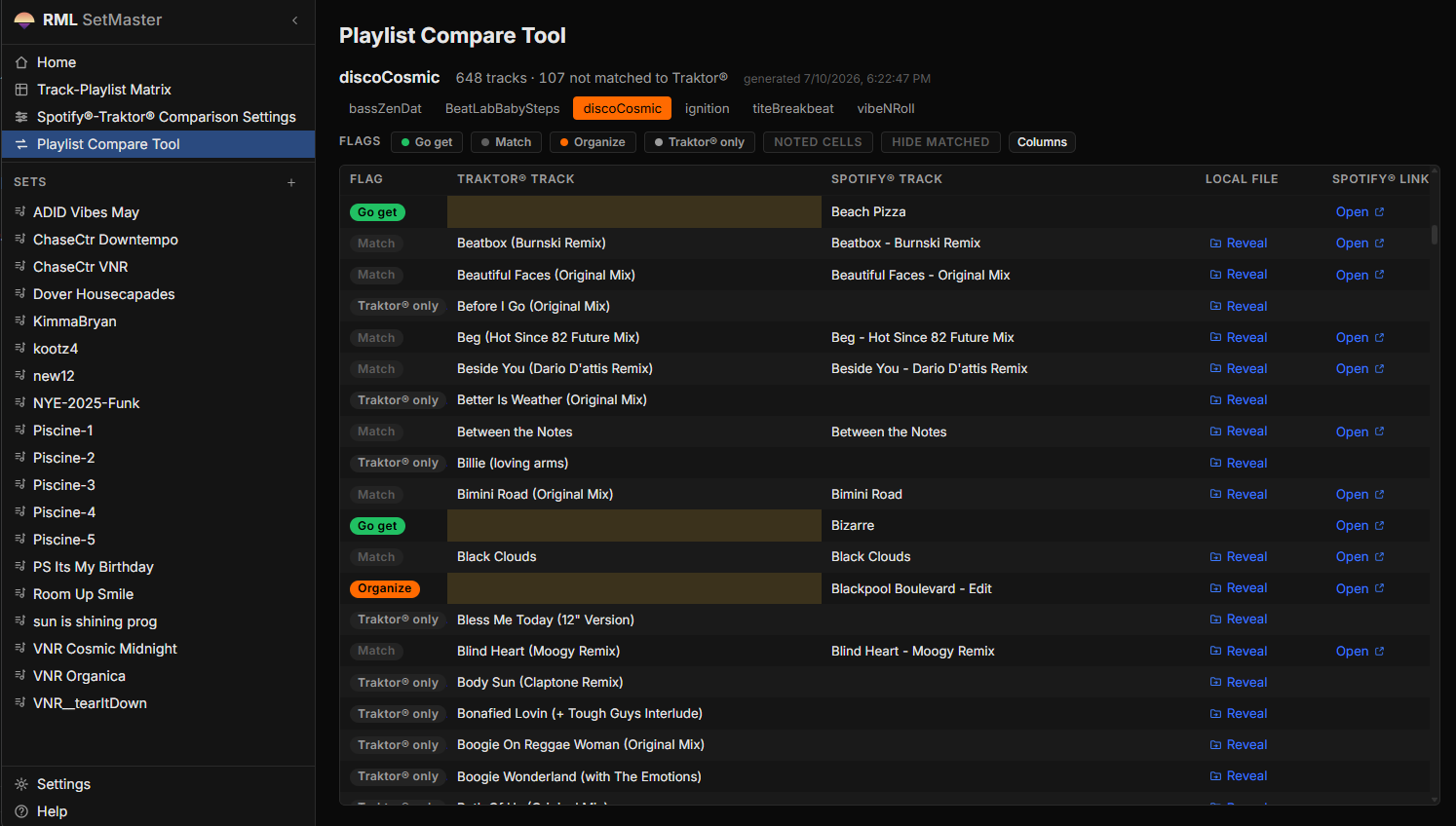
Export your Spotify® playlists as CSV with exportify.net and point SetMaster 3 at the folder. The comparison answers the question you have been answering by hand for years: of everything you want to play, which of it you do not own yet. The answer is a short list, and the short list is what you buy.

  • Every row is flagged. Go get, Match, Organize, or Traktor® only.
  • Your notes survive every re-run. A note typed into a comparison cell is still there after a full re-import.
  • File based by design. There is no Spotify® API integration, and nothing leaves your machine.
The Playlist Compare Tool showing one playlist compared against the Traktor collection. Each row is flagged Go get, Match, Organize, or Traktor only, with links to reveal the local file or open the track on Spotify.
The Playlist Compare Tool. 648 tracks in one playlist, 107 of them not matched to Traktor®.
Built in the open

Four claims, all of them checkable.

  • Offline by design

    A local process and a browser interface on localhost. No cloud, no accounts, no telemetry, no external calls.

  • Read-only, always

    Your collection.nml is opened strictly read-only and never modified. It is an architectural constraint, not a setting.

  • Tested

    897 automated tests across the pipeline, the application, and the interface. The pipeline is verified byte-identical to its predecessor on real data.

  • Open source

    A public repository, MIT licensed, with every release and every artifact listed publicly on GitHub.

Honest status

What is next, and what is not ready.

SetMaster 3 is actively developed and played with in real gigs.

  • Planned

    Rekordbox® collection import. There is no date on it.

  • Not tested

    The end-to-end suite and the pipeline golden-master tests on macOS. They pass on Windows and have never been run on a Mac. The macOS artifact has its own acceptance test, which it passed on a clean install.

  • Not supported

    Intel Macs, and macOS 13 or earlier. The bundled numerical libraries ship for Apple silicon on macOS 14, and the disk image refuses to build if anything inside it needs more than the app claims.

  • Deferred

    Perform Mode, and the natural-language filter bar. Specified and waiting, not abandoned.

Origin

Three versions in three years.

  • 2023 · The spreadsheet

    One row per transition

    A Google Sheet, then Excel, built on planes between gigs and used in professional sets from the start. The layout that everything since is built on was decided here.

  • Then · SetMaster 2

    The catalog becomes data

    VBA and Python behind the workbook. The Traktor® collection became something to filter rather than browse, and a one-off comparison against Spotify® playlists turned into the feature the tool is now built around.

  • 2026 · SetMaster 3

    Specified, then rebuilt

    A complete specification first, then an offline web application built from it. Five rounds, 93 issues, 897 tests, and a data pipeline ported byte-identically from the version before it.
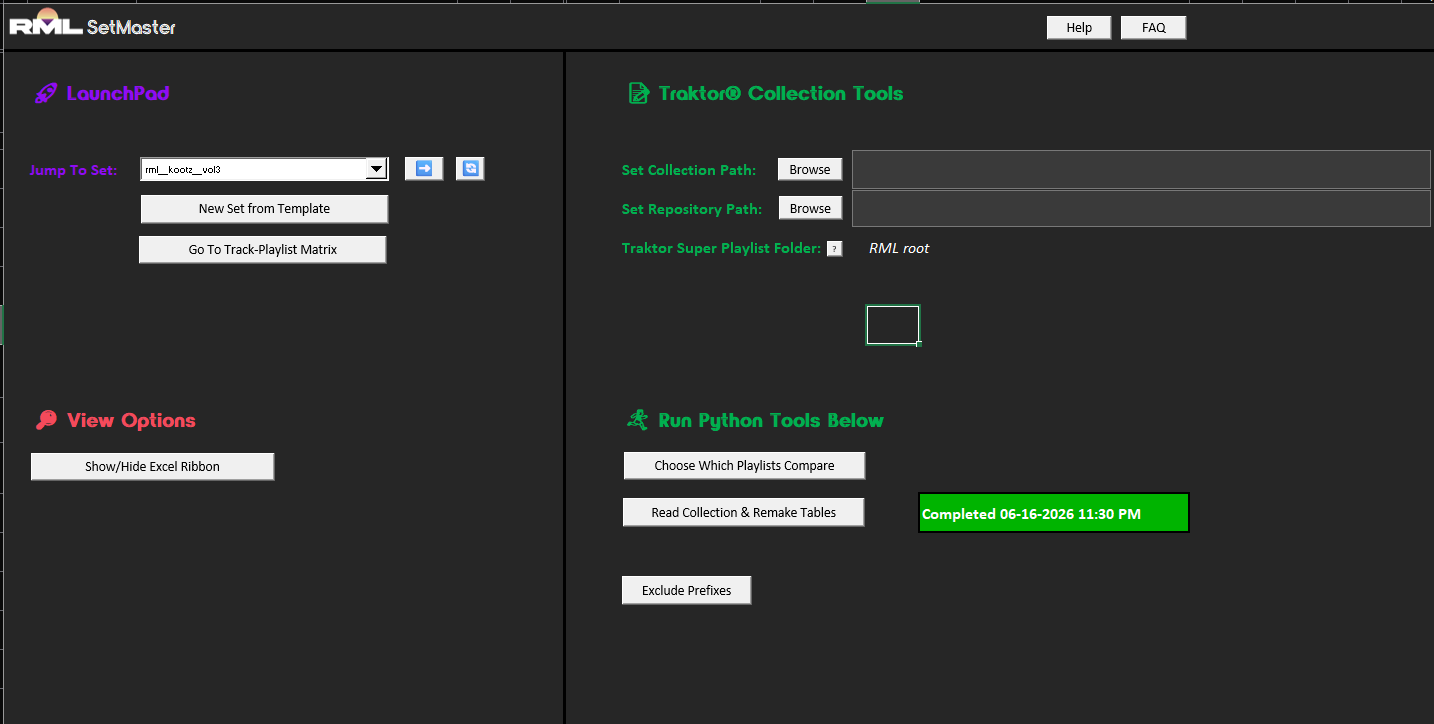
The SetMaster 2 LaunchPad tab: a set selector, buttons for a new set from template and for jumping to the Track-Playlist Matrix, the Traktor collection and repository path fields with their values redacted, and the Python tools that read the collection and rebuild the tables
The SetMaster 2 workbook, where the catalog first became data. Collection paths redacted.

The full story: the specification, the port, the tests, and what is still unfinished.

Read the case study

SetMaster 3 is independent fan software and is not affiliated with, endorsed by, or sponsored by Native Instruments®, Spotify®, or Exportify. Traktor® is a registered trademark of Native Instruments GmbH. Spotify® is a registered trademark of Spotify AB. Rekordbox® is a registered trademark of AlphaTheta Corporation.